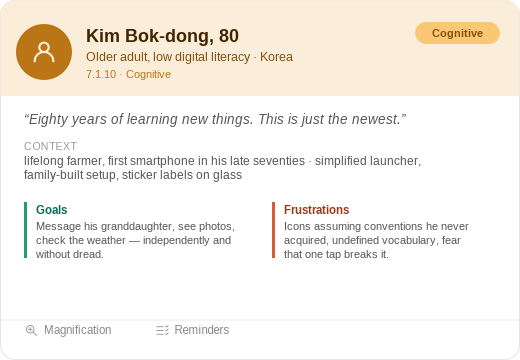
김복동 · Kim Bok-dong
Older adult, low digital literacy
Korea · East Asia (Korea) · Age 80
- Law
- 장차법 · KWCAG 2.2
- Services
- 정부24 / 카카오·토스
- Messaging
- KakaoTalk
Assistive Technology
- Magnification
- Reminders
Eighty years of learning new things. This is just the newest.
Goals
Message his granddaughter, see photos, check the weather — independently and without dread.
Frustrations
Icons assuming conventions he never acquired, undefined vocabulary, fear that one tap breaks it.
Profile
Kim Bok-dong is an older adult who farmed his whole life and only recently started using a smartphone. With almost no experience of digital devices, he finds the meaning of icons and gestures hard to grasp. But out of a wish to stay in touch with family, he tries hard to learn.
Technology Environment
- Device: large-screen smartphone, simple launcher
- Main apps: phone, KakaoTalk, photo album, weather
- Aids: magnifier, paper manual, sticky notes
- Learning method: family demonstrating directly, repeated practice
Daily Scenario
Saturday afternoon, Bok-dong wants to message his granddaughter in Seoul on KakaoTalk. He's gotten used to opening the app, but finding her is the problem. He can't spot her name in the chat list and opens chats one by one to check—he'd forgotten the 'Our Family' folder his son made for him.
<!-- A simplified interface for Bok-dong -->
<div class="senior-friendly-interface">
  <header class="app-header">
    <h1 class="large-text">KakaoTalk</h1>
    <button class="help-button" aria-label="Help"><span class="text">Help</span></button>
  </header>

  <nav class="main-navigation">
    <button class="nav-item active">
      <img src="family-icon.png" alt="Family" class="large-icon">
      <span class="label">Our Family</span>
    </button>
    <button class="nav-item">
      <img src="all-chats-icon.png" alt="All chats" class="large-icon">
      <span class="label">All chats</span>
    </button>
  </nav>

  <main class="chat-list">
    <h2 class="section-title">👪 Our Family</h2>
    <button class="contact-card">
      <img src="granddaughter-photo.jpg" alt="Granddaughter Min-ji" class="profile-photo">
      <div class="contact-info">
        <h3 class="name">Granddaughter Min-ji ❤️</h3>
        <p class="last-message">Love you, Grandpa!</p>
        <p class="instructions">Tap here to chat</p>
      </div>
    </button>
    <button class="contact-card">
      <img src="son-photo.jpg" alt="Son" class="profile-photo">
      <div class="contact-info">
        <h3 class="name">Son Hyun-soo</h3>
        <p class="last-message">Dad, did you take your medicine?</p>
      </div>
    </button>
  </main>

  <footer class="action-guide">
    <p>💡 What you can do now: tap a family member's name to chat</p>
  </footer>
</div>

<style>
  .senior-friendly-interface { font-size: 24px; line-height: 1.8; }
  .large-icon { width: 60px; height: 60px; }
  .contact-card { padding: 20px; margin: 15px; border: 3px solid #ddd; background: #f9f9f9; }
  .contact-card:active { background: #e0e0e0; border-color: #4CAF50; }
  .instructions { color: #666; font-size: 18px; font-style: italic; }
</style>
Trying to type a message, the keyboard is too small—reaching for one vowel he keeps hitting the next. As his son taught him, Bok-dong finds and presses the voice-input button. "Min-ji, how are you, it's Grandpa," he says slowly and clearly, and it converts to text. Marveling, he presses send.
He wants to send a photo but can't recall how. He takes out a note he'd written on paper: "Send a photo: + button → album → choose photo → send." Following the steps, he successfully sends a photo of the cabbages from his garden.
Challenges & Strategies
- Terms and concepts: words like 'app,' 'tap,' and 'swipe' are unfamiliar. Bok-dong understands them through everyday metaphors (app = drawer, tap = a light press).
- Icon meanings: abstract icons don't register. He marks frequently used apps with stickers.
- Fear of mistakes: he's afraid of breaking something by pressing the wrong thing. He repeats his son's reassurance: "No matter what you press, it won't break."
Design Implications
- Clear labels: large text labels alongside icons.
- Simple structure: shallow, intuitive navigation.
- Error prevention: easy undo, and confirmation for important actions.
- Learning support: step-by-step guides and a practice mode.